
Version 9.11 introduced the ability to bypass individual effects within preset chains, making it easier to understand what each effect contributes to your sound.
Effect Bypass
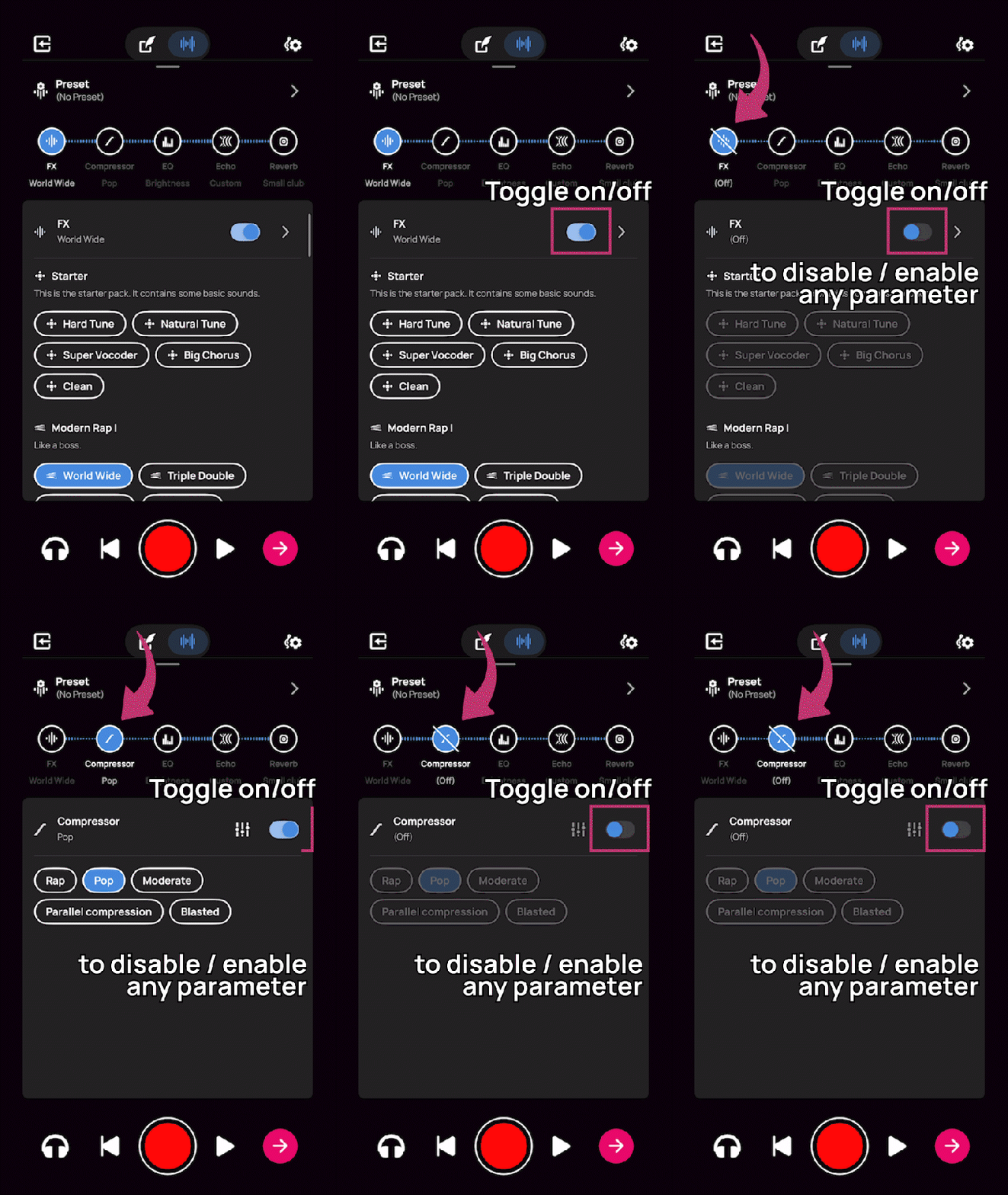
We've made it easier to toggle effects on and off while working with preset chains. Now you can quickly bypass individual effects to hear exactly what each one is contributing to your sound. This works for all vocal effects and audio processing tools.
What It Does
Toggle individual effects on and off using a switch at the top of each effect's settings. When an effect is bypassed:
- A diagonal line appears across the effect icon
- The effect is turned off but your settings are preserved
- You can toggle it back on anytime with all settings intact
Why It Matters
Previously, you couldn't easily isolate what each effect in a chain was doing. With effect bypass, you can now A/B test your sound with and without specific effects, making it easier to understand how each processing stage affects your vocals.
Learn More
For detailed step-by-step instructions, see: How to Bypass Effects in Voloco
Comments
0 comments
Article is closed for comments.